> For the complete documentation index, see [llms.txt](https://docs.payrexx.com/platform/llms.txt). Markdown versions of documentation pages are available by appending `.md` to page URLs; this page is available as [Markdown](https://docs.payrexx.com/platform/english/admin/settings/dashboard-messages.md).
# Dashboard Messages
Learn how to inform your connected merchants about important news directly on their dashboard.
To do this, log in to your platform administration and navigate to **Settings > Dashboard Messages**.
## Creating a Dashboard Message
In the following window, you can enter the desired message and, optionally, a link to additional information in multiple languages:
Creating a dashboard message in multiple languages
### Using placeholders
You can enhance messages with the following placeholders to generate dynamic content:
* \[INSTANCE\_NAME]: This placeholder will display the merchant’s instance name.
* \[INSTANCE\_EMAIL]: This placeholder will display the email address registered as the account owner in the merchant administration under **Settings > User Administration**.
### Multilingual messages
If desired, you can create messages in the following languages: :flag\_ch: German (Switzerland), :flag\_de: German (Germany), :flag\_gb: English, :flag\_fr: French, :flag\_it: Italian, :flag\_nl: Dutch, :flag\_pt: Portuguese, :flag\_tr: Turkish, :flag\_pl: Polish, :flag\_es: Spanish, :flag\_dk: Danish, :flag\_se: Swedish, and :flag\_no: Norwegian.
The message will be displayed on the merchant’s dashboard in the corresponding language.
{% hint style="info" %}
The message will only appear in the merchant’s dashboard if it has been created in the language activated in their account.
{% endhint %}
## Dashboard Message from the Merchant’s Perspective
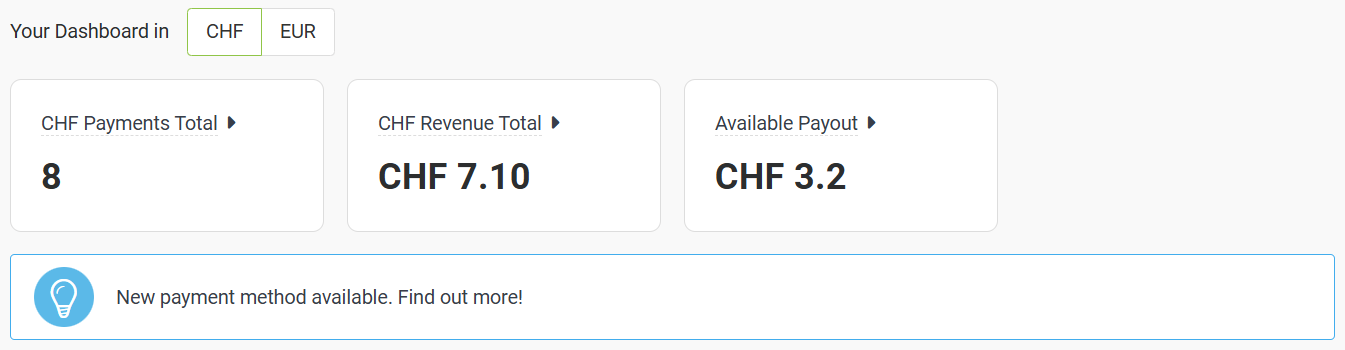
In the [merchant’s dashboard](https://docs.payrexx.com/merchant/english/account/dashboard), the message will appear as follows:
Display of the previously created message in the merchant’s dashboard
---
# Agent Instructions
This documentation is published with GitBook. GitBook is the documentation platform designed so that both humans and AI agents can read, navigate, and reason over technical content effectively. Learn more at gitbook.com.
## Querying This Documentation
If you need additional information that is not directly available in this page, you can query the documentation by asking a question.
Perform an HTTP GET request on the following URL with the `ask` and `goal` query parameters:
```
GET https://docs.payrexx.com/platform/english/admin/settings/dashboard-messages.md?ask=&goal=
```
`ask` is the immediate question: it should be specific, self-contained, and written in natural language.
`goal` is what the user is ultimately trying to achieve, the reason they need the answer. Sharing it helps GitBook give you a better, more relevant answer. A goal is most helpful when it describes the outcome the user wants rather than restating the question. For example, with `ask=how do I create an API token`, a goal like `automate deployments from our CI pipeline` lets GitBook tailor the answer to that use case.
The response will contain a direct answer to the question and relevant excerpts and sources from the documentation.
Use this mechanism when the answer is not explicitly present in the current page, you need clarification or additional context, or you want to retrieve related documentation sections.