> For the complete documentation index, see [llms.txt](https://docs.payrexx.com/platform/llms.txt). Markdown versions of documentation pages are available by appending `.md` to page URLs; this page is available as [Markdown](https://docs.payrexx.com/platform/admin/einstellungen.md).

# Einstellungen

Auf den folgenden Seiten erfährst Du alles über die verfügbaren Plattform-Einstellungen.

Die Plattform-Einstellungen sind in die folgenden zehn Unterbereiche unterteilt. Klicke auf den jeweiligen Link, um mehr zu erfahren.

## Übersicht über die Einstellungen

<table data-view="cards"><thead><tr><th></th><th></th><th data-hidden></th><th data-hidden></th></tr></thead><tbody><tr><td><a href="/platform/admin/einstellungen/e-mails.md">E-Mails</a></td><td>Bearbeiten und Übersetzen der automatisierten Benachrichtigungen, die per E-Mail aus dem System an die Händler verschickt werden</td><td></td><td></td></tr><tr><td><a href="/platform/admin/einstellungen/e-mail-template.md">Mail-Templates</a></td><td>Änderungen zum Look &#x26; Feel der E-Mails, die an Händler gesendet werden</td><td></td><td></td></tr><tr><td><a href="/platform/admin/einstellungen/dashboard-messages.md">Dashboard-Mitteilungen</a></td><td>Verwaltung von Mitteilungen, die direkt im Dashboard deiner Händler angezeigt werden</td><td></td><td></td></tr><tr><td><a href="/platform/admin/einstellungen/rechtliche-vorlagen.md">Rechtliche Vorlagen</a></td><td>Hinterlegen und Bearbeiten rechtlicher Inhalte wie AGB, Datenschutzerklärung und Impressum</td><td></td><td></td></tr><tr><td><a href="/platform/admin/einstellungen/kontaktangaben.md">Kontaktangaben</a></td><td>Kontaktdaten und E-Mail-Adressen für den Erhalt von Benachrichtigungen erfassen</td><td></td><td></td></tr><tr><td><a href="/platform/admin/einstellungen/standard-frontend-template.md">Standard Frontend Template</a></td><td>Festlegen der standardmässigen Darstellung des Zahlungsgateways Deiner Händler</td><td></td><td></td></tr><tr><td><a href="/platform/admin/einstellungen/backend-template.md">Backend Template</a></td><td>Anpassen des standardmässigen Look &#x26; Feel des Händler-Backends</td><td></td><td></td></tr><tr><td><a href="/platform/admin/einstellungen/benutzerverwaltung.md">Benutzerverwaltung</a></td><td>Erstellen und Verwalten von Benutzerkonten sowie Zuweisen von Rollen für die Mitarbeitenden der Plattform.</td><td></td><td></td></tr><tr><td><a href="/platform/admin/einstellungen/rechnungsstellung.md">Rechnungsstellung</a></td><td>Konfiguration der Einstellungen für den Rechnungs- und Mahnwesenprozess gegenüber den Händlern.</td><td></td><td></td></tr><tr><td><a href="/platform/admin/einstellungen/plugins.md">Plugins</a></td><td>Bereitstellen von Plugins, um die Plattform mit den E‑Commerce-Lösungen der Händler zu verbinden.</td><td></td><td></td></tr></tbody></table>

### Sprache der Plattform-Administration

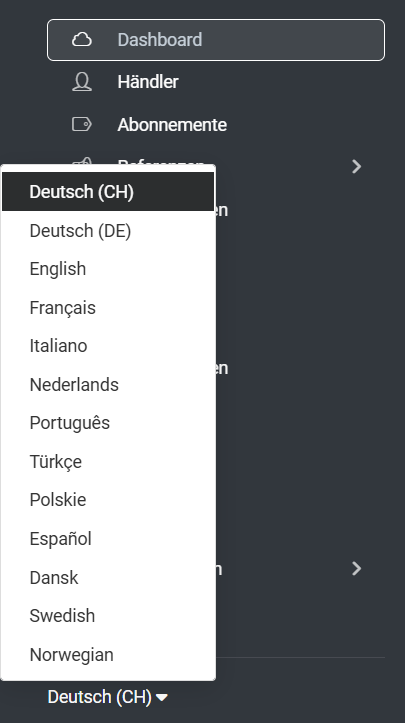
Falls Du die Sprache Deiner Plattform-Administration ändern möchtest, findest Du im unteren Teil des Hauptmenüs die entsprechende Schaltfläche. Payrexx steht in den folgenden Sprachen zur Verfügung:

<div align="left"><figure><img src="https://3230760650-files.gitbook.io/~/files/v0/b/gitbook-x-prod.appspot.com/o/spaces%2FOYBmWatLYJdLNb236XGk%2Fuploads%2Fk2jJrau9O25Y0MDURXiV%2Fimage.png?alt=media&amp;token=a08f4064-35ab-49ed-b4c1-a8f7540cd08d" alt="" width="203"><figcaption><p>Wechsel der Sprache in Payrexx</p></figcaption></figure></div>

{% hint style="info" %}
Diese Spracheinstellung bezieht sich auf die Plattform-Administration Deines Payrexx-Kontos. Die angeschlossenen Händler können die [Sprache ihrer Administrations-Oberfläche](https://docs.payrexx.com/merchant/payrexx-administration/dashboard#sprachen) selbst wählen.
{% endhint %}


---

# Agent Instructions
This documentation is published with GitBook. GitBook is the documentation platform designed so that both humans and AI agents can read, navigate, and reason over technical content effectively. Learn more at gitbook.com.

## Querying This Documentation
If you need additional information that is not directly available in this page, you can query the documentation by asking a question.

Perform an HTTP GET request on the following URL with the `ask` and `goal` query parameters:

```
GET https://docs.payrexx.com/platform/admin/einstellungen.md?ask=<question>&goal=<user_goal>
```

`ask` is the immediate question: it should be specific, self-contained, and written in natural language.
`goal` is what the user is ultimately trying to achieve, the reason they need the answer. Sharing it helps GitBook give you a better, more relevant answer. A goal is most helpful when it describes the outcome the user wants rather than restating the question. For example, with `ask=how do I create an API token`, a goal like `automate deployments from our CI pipeline` lets GitBook tailor the answer to that use case.

The response will contain a direct answer to the question and relevant excerpts and sources from the documentation.

Use this mechanism when the answer is not explicitly present in the current page, you need clarification or additional context, or you want to retrieve related documentation sections.
