> For the complete documentation index, see [llms.txt](https://docs.payrexx.com/merchant/llms.txt). Markdown versions of documentation pages are available by appending `.md` to page URLs; this page is available as [Markdown](https://docs.payrexx.com/merchant/integration/e-commerce/flow-shopsoftware.md).
# FLOW Shopsoftware
Auf dieser Seite findest Du Informationen zu FLOW Shopsoftware und erfährst, wie Du die Shop-Lösung an Payrexx anbinden kannst.
## Allgemein
FLOW Shopsoftware ist eine deutsche Lösung, die sich auf benutzerfreundliche Systeme für Onlineshops spezialisiert hat. FLOW Shopsoftware zeichnet sich durch eine einfache Bedienbarkeit und hohe Designflexibilität aus.
FLOW Shopsoftware ist verfügbar für Händler aus der :flag\_eu: Europäischen Union und der :flag\_ch: Schweiz.
### Links
* [Webseite](https://www.shopsoftware.com/) von FLOW Shopsoftware
* Download [Plugin](https://shopsoftware.com/580/Module-Payrexx---Zahlungsartprovider-Fuer-Version-Extended)
{% hint style="info" %}
Bitte beachte, dass die Integration in FLOW Shopsoftware nur in den Preisplänen "Standard" und "Premium" verfügbar ist. [Weitere Informationen](https://payrexx.com/de-ch/preise)
{% endhint %}
## Integration
### Installation von FLOW Shopsoftware
FLOW Shopsoftware kann auf der [Webseite](https://www.shopsoftware.com/k1/FLOW-Shopsoftware) des Anbieters bestellt werden. Dabei kann der Händler wählen, ob er sie kaufen oder mieten möchte.
Bei der Mietlösung ist das Hosting inbegriffen, die Software immer auf dem neusten Stand und fixfertig konfiguriert.
Bei der Kauflösung erhält der Händler eine Zip-Datei und installiert die Software selber. FLOW Shopsoftware bietet allerdings auch einen kostenlosen Installationsservice an.
### Konfiguration von Payrexx
{% hint style="info" %}
Bitte beachte, dass Du bei Payrexx [eingeloggt](https://login.payrexx.com/de) sein musst, bevor Du beginnst. Falls Du noch kein Konto hast, [registriere](https://signup.payrexx.com/de/email-validation/) Dich bitte bei Payrexx.
{% endhint %}
Um mit der Integration von FLOW Shopsoftware zu beginnen, navigiere im Hauptmenü Deines Payrexx-Kontos zu **Webhooks** und klicke auf "Webhook hinzufügen".
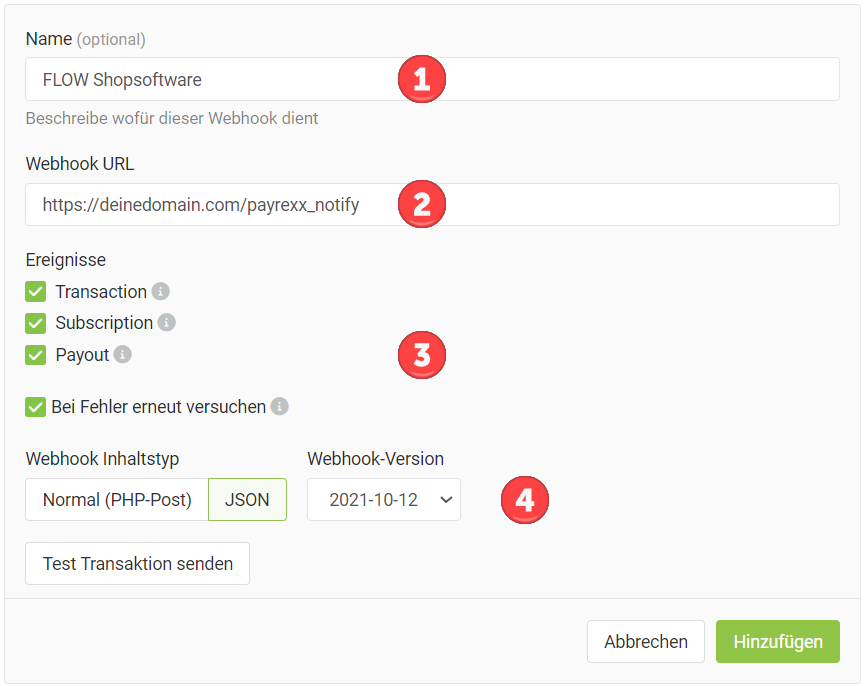
Nimm im nächsten Schritt die Konfiguration des Webhooks anhand folgender Anleitung vor:
1. Vergib für den Webhook einen beliebigen Namen, beispielsweise FLOW Shopsoftware.
2. Erfasse als Webhook URL Deine eigene Domain, gefolgt von einem Schrägstrich und dem Parameter "payrexx\_notify", wie es im folgenden Screenshot dargestellt ist.
3. Stelle sicher, dass alle vier Checkboxen aktiviert sind.
4. Wähle als Webhook-Inhaltstyp "JSON" und als Webhook-Version "2021-10-12".
Konfiguration des Webhooks für die Anbindung von FLOW Shopsoftware an Payrexx
Vergiss nicht, die Konfiguration abzuschliessen, indem Du auf die grüne Schaltfläche "Hinzufügen" klickst.
---
# Agent Instructions
This documentation is published with GitBook. GitBook is the documentation platform designed so that both humans and AI agents can read, navigate, and reason over technical content effectively. Learn more at gitbook.com.
## Querying This Documentation
If you need additional information that is not directly available in this page, you can query the documentation by asking a question.
Perform an HTTP GET request on the following URL with the `ask` and `goal` query parameters:
```
GET https://docs.payrexx.com/merchant/integration/e-commerce/flow-shopsoftware.md?ask=&goal=
```
`ask` is the immediate question: it should be specific, self-contained, and written in natural language.
`goal` is what the user is ultimately trying to achieve, the reason they need the answer. Sharing it helps GitBook give you a better, more relevant answer. A goal is most helpful when it describes the outcome the user wants rather than restating the question. For example, with `ask=how do I create an API token`, a goal like `automate deployments from our CI pipeline` lets GitBook tailor the answer to that use case.
The response will contain a direct answer to the question and relevant excerpts and sources from the documentation.
Use this mechanism when the answer is not explicitly present in the current page, you need clarification or additional context, or you want to retrieve related documentation sections.