# Übersicht über Payrexx

## Payrexx, die einfachste Zahlungsplattform der Welt

Payrexx ermöglicht Dir eine sichere und einfache Abwicklung weltweiter Kundenzahlungen. Du benötigst weder eine eigene Webseite noch Programmierkenntnisse, um Zahlungen mit [Visa](https://docs.payrexx.com/merchant/bezahldienste/payrexx-pay/zahlungsmittel/visa), [Mastercard](https://docs.payrexx.com/merchant/bezahldienste/payrexx-pay/zahlungsmittel/mastercard), [TWINT](https://docs.payrexx.com/merchant/bezahldienste/payrexx-pay/zahlungsmittel/twint), [PostFinance Pay](https://docs.payrexx.com/merchant/bezahldienste/payrexx-pay/zahlungsmittel/postfinance-pay), [PayPal](https://docs.payrexx.com/merchant/bezahldienste/externe-zahlungsanbieter/wallets-and-alternative/paypal) und mehr als 200 weiteren Zahlungsmitteln zu empfangen.

### Registrieren und einen Monat kostenlos testen

Starte jetzt mit Payrexx, indem Du Dich registrierst und sämtliche Funktionen während 30 Tagen kostenlos testest:

{% embed url="<https://signup.payrexx.com/>" %}

Nachdem Du Dein Konto erstellt hast, wird automatisch für 30 Tage der kostenlose [Trial-Plan](https://docs.payrexx.com/merchant/payrexx-administration/einstellungen/plan-und-abrechnung#trial-plan) aktiviert, der es Dir erlaubt, alle Funktionen von Payrexx kennenzulernen und ausgiebig zu testen. Der Trial-Plan verlängert sich nicht automatisch.

### Willkommens-Seite

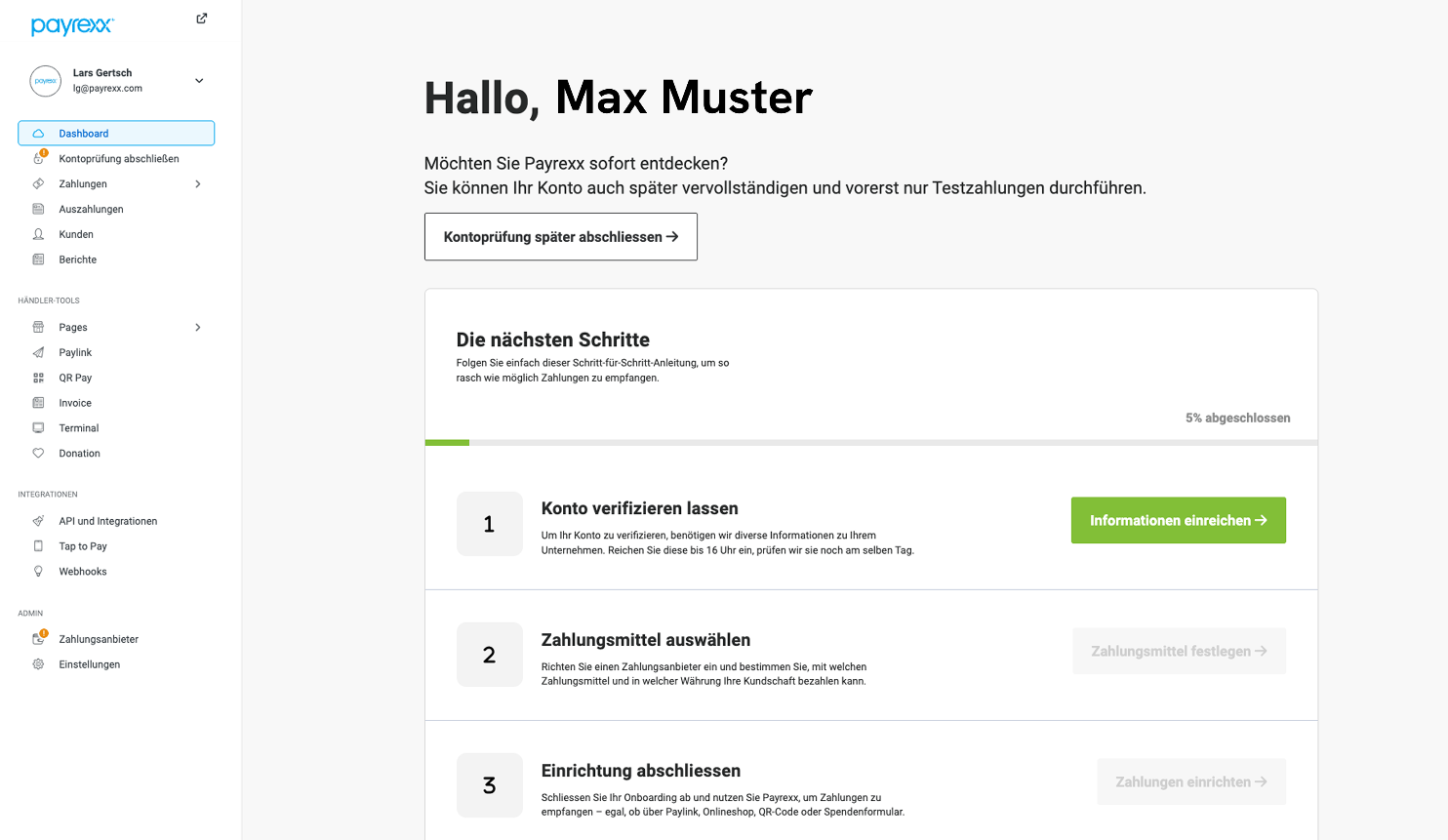
Nach dem Sign-up wird dem Benutzer eine Übersichtsseite mit den ersten Schritten angezeigt, die notwendig sind, um Payrexx nutzen zu können: die [Verifizierung des Kontos](https://docs.payrexx.com/merchant/erste-schritte/konto-verifizierung) und die [Auswahl der Zahlungsmittel](https://docs.payrexx.com/merchant/bezahldienste/payrexx-pay/aktivierung-und-konfiguration).

Die Schritte können bei Bedarf übersprungen und später nachgeholt werden. Auf der Übersichtsseite wird jeweils angezeigt, welche Aufgaben noch offen sind:

<div align="left"><figure><img src="https://3244062149-files.gitbook.io/~/files/v0/b/gitbook-x-prod.appspot.com/o/spaces%2F-MYJhU4qriZCz_Wxs0T0-543259558%2Fuploads%2FpsvSZAcAR7K7hkGPPneA%2Fimage.png?alt=media&#x26;token=932b331c-6278-40d0-9f41-563676134a2d" alt=""><figcaption><p>Anzeige der ersten Schritte auf der Willkommens-Seite bei Payrexx</p></figcaption></figure></div>

### Dashboard

Wenn die Einrichtung von Payrexx abgeschlossen ist, bildet das [Dashboard](https://docs.payrexx.com/merchant/payrexx-administration/dashboard) die Übersichtsseite der Händler-Administration:

<div align="left"><figure><img src="https://3244062149-files.gitbook.io/~/files/v0/b/gitbook-x-prod.appspot.com/o/spaces%2F-MYJhU4qriZCz_Wxs0T0-543259558%2Fuploads%2F5aPN5tV1UjKzonjB7dTx%2Fimage.png?alt=media&#x26;token=ac2ad0de-87fd-48aa-8365-b0344ee0e3e7" alt=""><figcaption><p>Die Händler-Administration mit dem Dashboard und dem Hauptmenü auf der linken Seite</p></figcaption></figure></div>

In der Händler-Administration findest Du unter anderem folgende Bereiche und Funktionen:

<details>

<summary>Zahlungen</summary>

In diesem Bereich findest Du alle Arten von Zahlungen und Kunden, Transaktionsberichte und Statistiken:

* [Dashboard](https://docs.payrexx.com/merchant/payrexx-administration/dashboard)
* [Zahlungen](https://docs.payrexx.com/merchant/zahlungen)
  * [Transaktionen](https://docs.payrexx.com/merchant/payrexx-administration/zahlungen/transaktionsdetails)
  * [Abonnemente](https://docs.payrexx.com/merchant/payrexx-administration/zahlungen/abonnemente)
  * [Vorautorisierungen](https://docs.payrexx.com/merchant/payrexx-administration/zahlungen/vorautorisierungen)
  * [Tokenisierungen](https://docs.payrexx.com/merchant/payrexx-administration/zahlungen/tokenisierungen)
* [Auszahlungen](https://docs.payrexx.com/merchant/payrexx-administration/auszahlungen)
* [Kunden](https://docs.payrexx.com/merchant/payrexx-administration/kunden)
* [Berichte](https://docs.payrexx.com/merchant/payrexx-administration/berichte)

</details>

<details>

<summary>Tools</summary>

In Payrexx stehen sechs [E-Commerce-Tools](https://docs.payrexx.com/merchant/payrexx-administration/tools) zur Verfügung, mit denen Du auch ogne eigene Webseite einfach, schnell und sicher Zahlungen von Kunden empfangen kannst:

* [Pages](https://docs.payrexx.com/merchant/payrexx-administration/tools/pages)
* [Paylink](https://docs.payrexx.com/merchant/payrexx-administration/tools/paylink)
* [QR Pay](https://docs.payrexx.com/merchant/payrexx-administration/tools/qr-pay)
* [Invoice](https://docs.payrexx.com/merchant/payrexx-administration/tools/invoice)
* [Terminal](https://docs.payrexx.com/merchant/payrexx-administration/tools/terminal)
* [Donation](https://docs.payrexx.com/merchant/payrexx-administration/tools/donation)

</details>

<details>

<summary>Integrationen</summary>

Payrexx lässt sich in die verschiedenen Systeme integrieren. Auf den folgenden Seiten erfährst Du mehr zum Thema:

* [E-Commerce-Systeme](https://docs.payrexx.com/merchant/integration/e-commerce)
* [Content-Management-Systeme](https://docs.payrexx.com/merchant/integration/content-management-system-cms)
* [Unternehmenssoftware](https://docs.payrexx.com/merchant/integration/unternehmenssoftware)
* [Individuelle Integrationen](https://docs.payrexx.com/merchant/integration/andere-integration)

</details>

<details>

<summary>Administration</summary>

In diesem Bereich befinden sich sämtliche Einstellungen zum Konto und zu den Zahlungsanbietern:

* [Payrexx Pay und Payrexx Pay Plus](https://docs.payrexx.com/merchant/bezahldienste/payrexx-pay)
* [Externe Zahlungsanbieter](https://docs.payrexx.com/merchant/bezahldienste/externe-zahlungsanbieter)
* [Einstellungen](https://docs.payrexx.com/merchant/payrexx-administration/einstellungen)

</details>

### Empfangen von Zahlungen

Um Zahlungen von Kunden entgegenzunehmen, stehen verschiedene Zahlungsanbieter zur Verfügung:

<table data-full-width="true"><thead><tr><th>Payrexx Pay</th><th>Payrexx Pay Plus</th><th>Externe Zahlungsanbieter</th></tr></thead><tbody><tr><td>Für Händler aus der Schweiz</td><td>Für Händler aus <a href="https://docs.payrexx.com/merchant/bezahldienste/payrexx-pay#payrexx-pay-plus">ausgewählten europäischen Ländern</a></td><td>Für Händler aus der ganzen Welt *</td></tr><tr><td>Verifiziertes Konto bei Payrexx notwendig</td><td>Verifiziertes Konto bei Payrexx notwendig</td><td>Verifiziertes Konto bei Payrexx nicht notwendig</td></tr><tr><td>Kein zusätzlicher Vertrag notwendig</td><td>Kein zusätzlicher Vertrag notwendig</td><td>Vertrag mit dem jeweiligen Anbieter notwendig</td></tr></tbody></table>

*\* Kontaktiere den jeweiligen Zahlungsanbieter, um herauszufinden, ob er in Deinem Land verfügbar ist.*

### Konto-Verifizierung

Verifiziere Dein Konto bei Payrexx, um unsere hauseigenen Zahlungsanbieter [Payrexx Pay und/oder Payrexx Pay Plus](https://docs.payrexx.com/merchant/bezahldienste/payrexx-pay) nutzen und sofort Live-Zahlungen entgegennehmen zu können:

{% content-ref url="konto-verifizierung" %}
[konto-verifizierung](https://docs.payrexx.com/merchant/erste-schritte/konto-verifizierung)
{% endcontent-ref %}

### Verfügbare Zahlungsmittel

Mit den in Payrexx integrierten Zahlungsanbietern [Payrexx Pay und Payrexx Pay Plus](https://docs.payrexx.com/merchant/bezahldienste/payrexx-direct) kannst Du Zahlungen Deiner Kunden über die folgenden Zahlungsmittel empfangen:

#### Payrexx Pay

Payrexx Pay steht ausschliesslich Händlern aus der :flag\_ch: Schweiz zur Verfügung.

|                                                                                                                                                                                                                                                                                                                                                                                                    |                                                                                                                                                                                                                                                                                                                                                                                    |
| -------------------------------------------------------------------------------------------------------------------------------------------------------------------------------------------------------------------------------------------------------------------------------------------------------------------------------------------------------------------------------------------------- | ---------------------------------------------------------------------------------------------------------------------------------------------------------------------------------------------------------------------------------------------------------------------------------------------------------------------------------------------------------------------------------- |
| <img src="https://3244062149-files.gitbook.io/~/files/v0/b/gitbook-x-prod.appspot.com/o/spaces%2F-MYJhU4qriZCz_Wxs0T0-543259558%2Fuploads%2FQ48CkXVdZaqjOaG1fUYb%2Fimage.png?alt=media&#x26;token=80b6cdec-dfcd-4963-9801-f55e221e0b3b" alt="" data-size="line"> [Mastercard](https://docs.payrexx.com/merchant/bezahldienste/payrexx-pay/zahlungsmittel/mastercard)                               | <img src="https://3244062149-files.gitbook.io/~/files/v0/b/gitbook-x-prod.appspot.com/o/spaces%2F-MYJhU4qriZCz_Wxs0T0-543259558%2Fuploads%2FL03hRtsM5LoSVLdrML54%2Fimage.png?alt=media&#x26;token=1f683f67-79a9-46d0-83ac-a98fb1964031" alt="" data-size="line"> [Samsung Pay](https://docs.payrexx.com/merchant/bezahldienste/payrexx-pay/zahlungsmittel/samsung-pay)             |
| <img src="https://3244062149-files.gitbook.io/~/files/v0/b/gitbook-x-prod.appspot.com/o/spaces%2F-MYJhU4qriZCz_Wxs0T0-543259558%2Fuploads%2FeqP1uxbyWvSUc4vRS6L8%2Fimage.png?alt=media&#x26;token=af4b7957-1f7b-4cf6-aa8e-bcf3c04f7b8e" alt="" data-size="line"> [Visa](https://docs.payrexx.com/merchant/bezahldienste/payrexx-pay/zahlungsmittel/visa)                                           | <img src="https://3244062149-files.gitbook.io/~/files/v0/b/gitbook-x-prod.appspot.com/o/spaces%2F-MYJhU4qriZCz_Wxs0T0-543259558%2Fuploads%2FqCx7GgBRADXSdUwhEN0J%2Fimage.png?alt=media&#x26;token=141f5fe1-bcca-4623-a9da-d5336d3d6812" alt="" data-size="line"> [Kauf auf Rechnung](https://docs.payrexx.com/merchant/bezahldienste/payrexx-pay/zahlungsmittel/kauf-auf-rechnung) |
| <img src="https://3244062149-files.gitbook.io/~/files/v0/b/gitbook-x-prod.appspot.com/o/spaces%2F-MYJhU4qriZCz_Wxs0T0-543259558%2Fuploads%2FSBIrn2lMHsRgB9Toh5qm%2Fcard_twint.svg?alt=media&#x26;token=69b4ce4e-d113-4d1a-ba61-782e2f5159ad" alt="" data-size="line"> [TWINT](https://docs.payrexx.com/merchant/bezahldienste/payrexx-pay/zahlungsmittel/twint)                                    | <img src="https://3244062149-files.gitbook.io/~/files/v0/b/gitbook-x-prod.appspot.com/o/spaces%2F-MYJhU4qriZCz_Wxs0T0-543259558%2Fuploads%2FLxH96U5DnFtDDZDPYwIb%2Fimage.png?alt=media&#x26;token=6fe3a84d-0db5-4b7a-9377-b42904032e9c" alt="" data-size="line"> [Pay by Bank](https://docs.payrexx.com/merchant/bezahldienste/payrexx-pay/zahlungsmittel/pay-by-bank)             |
| <img src="https://3244062149-files.gitbook.io/~/files/v0/b/gitbook-x-prod.appspot.com/o/spaces%2F-MYJhU4qriZCz_Wxs0T0-543259558%2Fuploads%2FLVgIjDrsMTOficb0o0E2%2Fcard_postfinance-pay%402x.png?alt=media&#x26;token=5b14cab5-b791-4e5f-9f4f-cf1b56a9878b" alt="" data-size="line"> [PostFinance Pay](https://docs.payrexx.com/merchant/bezahldienste/payrexx-pay/zahlungsmittel/postfinance-pay) | <img src="https://3244062149-files.gitbook.io/~/files/v0/b/gitbook-x-prod.appspot.com/o/spaces%2F-MYJhU4qriZCz_Wxs0T0-543259558%2Fuploads%2FoDuFvqWRuZy5IgqkdJms%2Fimage.png?alt=media&#x26;token=35513f38-90d3-4d1e-860d-1076a2316a88" alt="" data-size="line"> [Reka](https://docs.payrexx.com/merchant/bezahldienste/payrexx-pay/zahlungsmittel/reka)                           |
| <img src="https://3244062149-files.gitbook.io/~/files/v0/b/gitbook-x-prod.appspot.com/o/spaces%2F-MYJhU4qriZCz_Wxs0T0-543259558%2Fuploads%2F0Zooyx2YVdQIeawCTXZV%2Fimage.png?alt=media&#x26;token=37014444-056a-4661-a0ac-c7272a995cd7" alt="" data-size="line"> [Apple Pay](https://docs.payrexx.com/merchant/bezahldienste/payrexx-pay/zahlungsmittel/apple-pay)                                 | <img src="https://3244062149-files.gitbook.io/~/files/v0/b/gitbook-x-prod.appspot.com/o/spaces%2F-MYJhU4qriZCz_Wxs0T0-543259558%2Fuploads%2Fgsuzm3TJvdUOGGf46uPU%2Fimage.png?alt=media&#x26;token=4f359b73-dac8-4d18-b638-6756da6caf5e" alt="" data-size="line"> [Centi](https://docs.payrexx.com/merchant/bezahldienste/payrexx-pay/zahlungsmittel/centi)                         |
| <img src="https://3244062149-files.gitbook.io/~/files/v0/b/gitbook-x-prod.appspot.com/o/spaces%2F-MYJhU4qriZCz_Wxs0T0-543259558%2Fuploads%2F6PKlwAGAs7VdrQBpgsxj%2Fimage.png?alt=media&#x26;token=0e23ce6c-bf94-4ceb-9037-25ee9528dbdc" alt="" data-size="line"> [Google Pay](https://docs.payrexx.com/merchant/bezahldienste/payrexx-pay/zahlungsmittel/google-pay)                               |                                                                                                                                                                                                                                                                                                                                                                                    |

#### Payrexx Pay Plus

Payrexx Pay Plus steht ausschliesslich Händlern aus der :flag\_ch: Schweiz, :flag\_li: Liechtenstein, :flag\_at: Österreich, :flag\_de: Deutschland, :flag\_fr: Frankreich, :flag\_it: Italien, :flag\_dk: Dänemark, :flag\_lu: Luxemburg und :flag\_bg: Bulgarien zur Verfügung.

|                                                                                                                                                                                                                                                                                                                                                                                                                                                                                                                                                       |                                                                                                                                                                                                                                                                                                                                                                                                                                                                                                                          |
| ----------------------------------------------------------------------------------------------------------------------------------------------------------------------------------------------------------------------------------------------------------------------------------------------------------------------------------------------------------------------------------------------------------------------------------------------------------------------------------------------------------------------------------------------------- | ------------------------------------------------------------------------------------------------------------------------------------------------------------------------------------------------------------------------------------------------------------------------------------------------------------------------------------------------------------------------------------------------------------------------------------------------------------------------------------------------------------------------ |
| <img src="https://docs.payrexx.com/~gitbook/image?url=https%3A%2F%2F3244062149-files.gitbook.io%2F%7E%2Ffiles%2Fv0%2Fb%2Fgitbook-x-prod.appspot.com%2Fo%2Fspaces%252F-MYJhU4qriZCz_Wxs0T0-543259558%252Fuploads%252FQ48CkXVdZaqjOaG1fUYb%252Fimage.png%3Falt%3Dmedia%26token%3D80b6cdec-dfcd-4963-9801-f55e221e0b3b&#x26;width=60&#x26;dpr=4&#x26;quality=100&#x26;sign=80630e94&#x26;sv=2" alt="" data-size="line"> [Mastercard](https://docs.payrexx.com/merchant/bezahldienste/payrexx-pay/zahlungsmittel/mastercard)                              | <img src="https://3244062149-files.gitbook.io/~/files/v0/b/gitbook-x-prod.appspot.com/o/spaces%2F-MYJhU4qriZCz_Wxs0T0-543259558%2Fuploads%2FGO3X31e6L3OwTpwUkRS3%2Fcard_eps.svg?alt=media&#x26;token=0ac1c277-4a16-4604-a66d-04dc2a3f098c" alt="" data-size="line"> [eps](https://docs.payrexx.com/merchant/bezahldienste/payrexx-pay/zahlungsmittel/eps)                                                                                                                                                                |
| <img src="https://docs.payrexx.com/~gitbook/image?url=https%3A%2F%2F3244062149-files.gitbook.io%2F%7E%2Ffiles%2Fv0%2Fb%2Fgitbook-x-prod.appspot.com%2Fo%2Fspaces%252F-MYJhU4qriZCz_Wxs0T0-543259558%252Fuploads%252FeqP1uxbyWvSUc4vRS6L8%252Fimage.png%3Falt%3Dmedia%26token%3Daf4b7957-1f7b-4cf6-aa8e-bcf3c04f7b8e&#x26;width=60&#x26;dpr=4&#x26;quality=100&#x26;sign=aa68926b&#x26;sv=2" alt="" data-size="line"> [Visa](https://docs.payrexx.com/merchant/bezahldienste/payrexx-pay/zahlungsmittel/visa)                                          | <img src="https://docs.payrexx.com/~gitbook/image?url=https%3A%2F%2F3244062149-files.gitbook.io%2F%7E%2Ffiles%2Fv0%2Fb%2Fgitbook-x-prod.appspot.com%2Fo%2Fspaces%252F-MYJhU4qriZCz_Wxs0T0-543259558%252Fuploads%252FaVsiUOeJGT9kKl7Fk86p%252Fimage.png%3Falt%3Dmedia%26token%3Db2cafcc3-8997-4ba7-be7e-7e93f0a656b3&#x26;width=60&#x26;dpr=4&#x26;quality=100&#x26;sign=bde7a3c3&#x26;sv=2" alt="" data-size="line"> [Bancontact](https://docs.payrexx.com/merchant/bezahldienste/payrexx-pay/zahlungsmittel/bancontact) |
| <img src="https://3244062149-files.gitbook.io/~/files/v0/b/gitbook-x-prod.appspot.com/o/spaces%2F-MYJhU4qriZCz_Wxs0T0-543259558%2Fuploads%2FwG1KePHchqBxkTLTEMbQ%2Fcard_american_express.svg?alt=media&#x26;token=db3d7e53-8e75-48cb-b821-404d03f5208b" alt="" data-size="line"> [American Express](https://docs.payrexx.com/merchant/bezahldienste/payrexx-pay/zahlungsmittel/american-express)                                                                                                                                                      | <img src="https://3244062149-files.gitbook.io/~/files/v0/b/gitbook-x-prod.appspot.com/o/spaces%2F-MYJhU4qriZCz_Wxs0T0-543259558%2Fuploads%2FWR8QA7VZyu6o7RGUZO9a%2Fimage.png?alt=media&#x26;token=572d4833-60ec-4aaf-b134-d6ad4f41215d" alt="" data-size="line"> [iDEAL](https://docs.payrexx.com/merchant/bezahldienste/payrexx-pay/zahlungsmittel/ideal)                                                                                                                                                               |
| <img src="https://docs.payrexx.com/~gitbook/image?url=https%3A%2F%2F3244062149-files.gitbook.io%2F%7E%2Ffiles%2Fv0%2Fb%2Fgitbook-x-prod.appspot.com%2Fo%2Fspaces%252F-MYJhU4qriZCz_Wxs0T0-543259558%252Fuploads%252FB5uaNiabeKwBksfd9bsH%252Fimage.png%3Falt%3Dmedia%26token%3D6babdc43-b439-4547-b7cb-08f94b92864c&#x26;width=54&#x26;dpr=4&#x26;quality=100&#x26;sign=ed60e1d&#x26;sv=2" alt="" data-size="line"> [Diners Club International](https://docs.payrexx.com/merchant/bezahldienste/payrexx-pay/zahlungsmittel/diners-club-international) | <img src="https://3244062149-files.gitbook.io/~/files/v0/b/gitbook-x-prod.appspot.com/o/spaces%2F-MYJhU4qriZCz_Wxs0T0-543259558%2Fuploads%2FWdffED5L2LfBAh1BhS1c%2Fcard_sepa.svg?alt=media&#x26;token=2884ed72-9012-41a3-988d-36930e492643" alt="" data-size="line"> [SEPA Debit Direct](https://docs.payrexx.com/merchant/bezahldienste/payrexx-pay/zahlungsmittel/sepa-debit-direct)                                                                                                                                   |
| <img src="https://docs.payrexx.com/~gitbook/image?url=https%3A%2F%2F3244062149-files.gitbook.io%2F%7E%2Ffiles%2Fv0%2Fb%2Fgitbook-x-prod.appspot.com%2Fo%2Fspaces%252F-MYJhU4qriZCz_Wxs0T0-543259558%252Fuploads%252F0bPY41wqNkkWq2BV0nyr%252Fimage.png%3Falt%3Dmedia%26token%3D9362384e-873b-4ae5-a4cf-d5c339c9e222&#x26;width=61&#x26;dpr=4&#x26;quality=100&#x26;sign=2aad45df&#x26;sv=2" alt="" data-size="line"> [Discover Card](https://docs.payrexx.com/merchant/bezahldienste/payrexx-pay/zahlungsmittel/discover-card)                        | <img src="https://3244062149-files.gitbook.io/~/files/v0/b/gitbook-x-prod.appspot.com/o/spaces%2F-MYJhU4qriZCz_Wxs0T0-543259558%2Fuploads%2FyUr3CKIOMAgGTRnFLrCZ%2Fcard_wechat-pay.svg?alt=media&#x26;token=51d34050-1b94-4646-8923-b685c72a21ad" alt="" data-size="line"> [WeChat Pay](https://docs.payrexx.com/merchant/bezahldienste/payrexx-pay/zahlungsmittel/wechat-pay)                                                                                                                                           |
| <img src="https://3244062149-files.gitbook.io/~/files/v0/b/gitbook-x-prod.appspot.com/o/spaces%2F-MYJhU4qriZCz_Wxs0T0-543259558%2Fuploads%2F0Zooyx2YVdQIeawCTXZV%2Fimage.png?alt=media&#x26;token=37014444-056a-4661-a0ac-c7272a995cd7" alt="" data-size="line"> [Apple Pay](https://docs.payrexx.com/merchant/bezahldienste/payrexx-pay/zahlungsmittel/apple-pay)                                                                                                                                                                                    | <img src="https://3244062149-files.gitbook.io/~/files/v0/b/gitbook-x-prod.appspot.com/o/spaces%2F-MYJhU4qriZCz_Wxs0T0-543259558%2Fuploads%2F9r6yFzuc9BSGzvNEeu2P%2Fcard_alipay.svg?alt=media&#x26;token=1bb1f136-18b5-4dfe-af9f-11f52ac652d2" alt="" data-size="line"> [Alipay](https://docs.payrexx.com/merchant/bezahldienste/payrexx-pay/zahlungsmittel/alipay)                                                                                                                                                       |
| <img src="https://3244062149-files.gitbook.io/~/files/v0/b/gitbook-x-prod.appspot.com/o/spaces%2F-MYJhU4qriZCz_Wxs0T0-543259558%2Fuploads%2FaslPSpJR7o20IpLYVPrh%2Fcard_google-pay.svg?alt=media&#x26;token=5af47904-ab64-4095-a1a9-f27719f28b13" alt="" data-size="line"> [Google Pay](https://docs.payrexx.com/merchant/bezahldienste/payrexx-pay/zahlungsmittel/google-pay)                                                                                                                                                                        | <img src="https://3244062149-files.gitbook.io/~/files/v0/b/gitbook-x-prod.appspot.com/o/spaces%2F-MYJhU4qriZCz_Wxs0T0-543259558%2Fuploads%2Ftszyydp6IzodT2FHfz6L%2Fcard_p24.svg?alt=media&#x26;token=2a1ef23c-0ee2-46c8-a774-96cf444b8294" alt="" data-size="line"> [Przelewy24](https://docs.payrexx.com/merchant/bezahldienste/payrexx-pay/zahlungsmittel/przelewy24)                                                                                                                                                  |
| <img src="https://docs.payrexx.com/~gitbook/image?url=https%3A%2F%2F3244062149-files.gitbook.io%2F%7E%2Ffiles%2Fv0%2Fb%2Fgitbook-x-prod.appspot.com%2Fo%2Fspaces%252F-MYJhU4qriZCz_Wxs0T0-543259558%252Fuploads%252F1zl1GbI7MIME3DEjOHN5%252Fimage.png%3Falt%3Dmedia%26token%3De3d04dd8-090a-495d-8f24-5a750e9bccc3&#x26;width=60&#x26;dpr=4&#x26;quality=100&#x26;sign=b949351a&#x26;sv=2" alt="" data-size="line"> [Klarna](https://docs.payrexx.com/merchant/bezahldienste/payrexx-pay/zahlungsmittel/klarna)                                      |                                                                                                                                                                                                                                                                                                                                                                                                                                                                                                                          |

Weitere Informationen zu den integrierten Zahlungsanbietern von Payrexx findest Du im folgenden Artikel:

{% content-ref url="../bezahldienste/payrexx-pay" %}
[payrexx-pay](https://docs.payrexx.com/merchant/bezahldienste/payrexx-pay)
{% endcontent-ref %}

### Weitere Zahlungsmöglichkeiten

Neben Payrexx Pay und Payrexx Pay Plus kannst Du auch [externe Zahlungsanbieter](https://docs.payrexx.com/merchant/bezahldienste/externe-zahlungsanbieter) in Payrexx einbinden.

Die Auswahl verfügbarer Zahlungsanbieter kann je nach Standort Deines Unternehmens variieren. Weitere Informationen findest Du unter den nachstehenden Links.

* [Liste](https://docs.payrexx.com/merchant/bezahldienste/externe-zahlungsanbieter) der verfügbaren externen Zahlungsanbieter
* [Funktionsmatrix](https://docs.payrexx.com/merchant/bezahldienste/funktionsmatrix) der externen Zahlungsanbieter
* [Länder-Verfügbarkeit](https://docs.payrexx.com/merchant/bezahldienste/lander-verfugbarkeit) der Zahlungsanbieter

{% hint style="info" %}
Bitte beachte, dass bei der Verwendung externer Zahlungsanbieter je nach [Payrexx-Plan](https://docs.payrexx.com/merchant/payrexx-administration/einstellungen/plan-und-abrechnung) zusätzliche Kosten anfallen. Deinen Plan kannst Du jederzeit [upgraden](https://docs.payrexx.com/merchant/payrexx-administration/einstellungen/plan-und-abrechnung#anderung-des-plans).
{% endhint %}

### E-Commerce-Tools

Payrexx ist nicht nur Zahlungsanbieter, sondern stellt auch verschiedene [E-Commerce-Tools](https://docs.payrexx.com/merchant/payrexx-administration/tools) zur Verfügung:

<figure><img src="https://3244062149-files.gitbook.io/~/files/v0/b/gitbook-x-prod.appspot.com/o/spaces%2F-MYJhU4qriZCz_Wxs0T0-543259558%2Fuploads%2F8bz9QXfc6VOA1WBPwK5m%2Fimage.png?alt=media&#x26;token=ed7de5e0-5e9a-4110-96b2-127a85842c36" alt=""><figcaption><p>Übersicht über die verschiedenen E-Commerce-Tools von Payrexx</p></figcaption></figure>

Weitere Informationen zu den Tools von Payrexx findest Du unter dem folgenden Link:

{% content-ref url="../payrexx-administration/tools" %}
[tools](https://docs.payrexx.com/merchant/payrexx-administration/tools)
{% endcontent-ref %}

### Integration in E-Commerce-Systeme

Integriere Payrexx als Plugin in Deinen Online-Shop. Payrexx ist kompatibel mit allen populären Shop- und CMS-Lösungen:

<div align="left"><figure><img src="https://3244062149-files.gitbook.io/~/files/v0/b/gitbook-x-prod.appspot.com/o/spaces%2F-MYJhU4qriZCz_Wxs0T0-543259558%2Fuploads%2FYnIgpNAnheOUSDi9jI33%2Fimage.png?alt=media&#x26;token=412127db-88e9-4156-b66f-ccf9d1533572" alt=""><figcaption><p>Payrexx bietet eine Vielzahl an Integrationen in andere E-Commerce-Tools.</p></figcaption></figure></div>

Unter dem folgenden Link findest Du weitere Informationen zu den E-Commerce-Systemen und entsprechende Anleitungen zur Integration:

{% content-ref url="../integration/e-commerce" %}
[e-commerce](https://docs.payrexx.com/merchant/integration/e-commerce)
{% endcontent-ref %}

### Weitere Integrations-Möglichkeiten

Die Zahlungslösung von Payrexx kann auf weitere Arten in Deine Webseite integriert werden. Mehr dazu findest Du in unserer Entwickler-Dokumentation:

{% embed url="<https://docs.payrexx.com/developer>" %}

### Achtung, fertig, los

Das Payrexx-Team wünscht Dir ganz viel Erfolg und steht Dir bei Fragen gerne zur Verfügung.&#x20;

Hast Du Fragen? Besuche unser Support-Portal:

{% content-ref url="../support/support-portal" %}
[support-portal](https://docs.payrexx.com/merchant/support/support-portal)
{% endcontent-ref %}
